


Baby Monitor Camera - NannyCam
4.23.00 Reviews
App Specs
- Version
- 1.2.1
- Updated On
- License
- Free
- Downloads
- 10,000+
- Developer
- Cubetix Ltd.
- Categories
- Parenting
- Platform
- Android
Screenshots
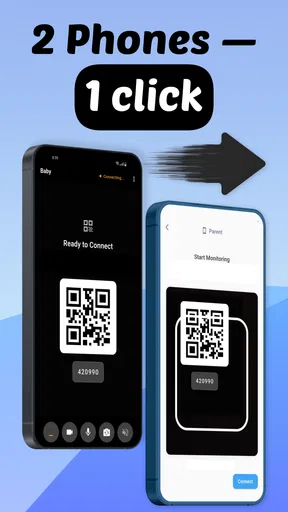
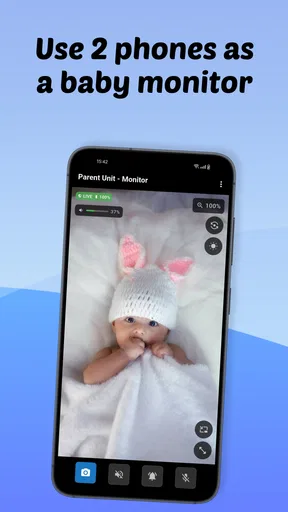
 Analysis by AppCompare
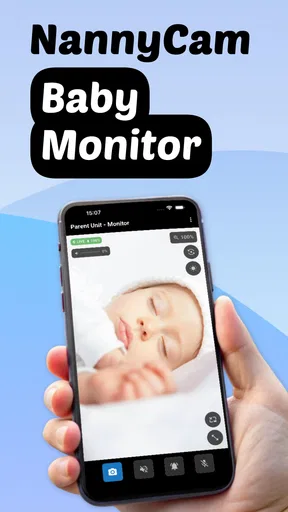
If you've ever found yourself pacing the floor while your baby sleeps, wondering if everything is alright, then you might want to check out the Baby Monitor Camera - NannyCam. It's designed to give parents peace of mind and keep an eye on their little ones without having to hover over the crib.
From first setup to a useful nursery check
Before relying on any phone-based monitor, I’d treat the first session as a calm practice run rather than a test during a stressful bedtime. Choose a time when you can stay near both devices, set them up where you intend to use them, and check that the picture and sound reach the parent phone. That small rehearsal helps you learn the routine while your baby is settled and you’re not trying to troubleshoot in the dark.
What to expect from a phone-based monitor
NannyCam is a parenting app from Cubetix Ltd. Its central idea is straightforward: use a phone as the camera-side device and another phone as the screen you check. That can be appealing if you already have a spare device and would rather avoid buying a separate monitor system. The app is free to download, while in-app purchases range from $2.99 to $29.99 per item, so I’d check what is included before deciding whether any paid option matters to your household.
Its store information describes Wi-Fi, 3G, offline use, and crying alerts. Those terms suggest flexibility, but they shouldn’t be read as a promise that every connection behaves identically. A live video feed depends on the devices, network, and conditions where you use it. I’d test the exact arrangement you plan to rely on, especially if you expect to check in away from home or during a network interruption.
This is best thought of as a convenient extra way to keep watch, not as a replacement for safe sleep practices or an adult’s attention. A phone can help you notice a sound or look in on a sleeping child, but it cannot respond physically, judge every situation, or guarantee that an alert will arrive at the right moment. I find that distinction reassuring rather than limiting: it helps keep the app in its proper role.
Getting Started with Ease
You'll be pleased to know that setting up the Baby Monitor Camera - NannyCam is as simple as pie. Just download the app from your device's app store, follow the easy-peasy setup instructions, and voilà, you’re good to go. The app is available for both Android and iOS, so no one gets left out of the loop.
One of the things I love is how the app connects seamlessly to your home Wi-Fi network. You don’t have to be a tech whiz to get it running. Once it’s all set up, the app provides a live feed from the camera straight to your phone. No more sneaking into the nursery and risking waking up your sleeping angel!
Worth Reading Before You Choose

EA SPORTS FC Mobile 26 Is a Bigger Football Game, but It Takes Time

Flipboard Shows What News Apps Must Do Beyond the Feed

Switching to Android Auto Means Rethinking Your Driving Routine

Google Calendar Makes a Crowded Week Easier to Manage

Ludo King Makes the Most of the Minutes Between Plans

Baby Panda World Brings Quick Play to Modern Phones, but Its Game Library Feels Busy
A less stressful first setup
For a first-time user, the most useful setup choice is deciding which phone will stay in the nursery and which one you’ll carry. Put the camera-side device on a stable surface with a clear view of the sleeping area, then make sure it is not somewhere it could fall or be reached by a child. Keep the screen visible without placing the device in or near the sleep space. I’d also make sure the camera view is useful before leaving the room; a lovely wide view is less valuable if a cot rail or furniture blocks the part you actually need to see.
Next, check the practical details that are easy to overlook: whether the camera-side phone can remain powered, whether its screen or app settings interfere with the feed, and whether the parent phone can receive the kind of alerts you want. The exact behavior can depend on your devices, so don’t assume that a successful sign-in means every part of the setup is ready. Confirm video, listen for audio, and make a deliberate test of an alert while you’re nearby.
It is also worth thinking about who should have access before inviting another caregiver. If you share monitoring duties with a partner or babysitter, agree on which device is acting as the camera and who will respond to an alert. A clear handoff prevents two people from assuming the other has checked, and it avoids leaving a nursery phone running after nobody needs it.
Features That Make Life Easier
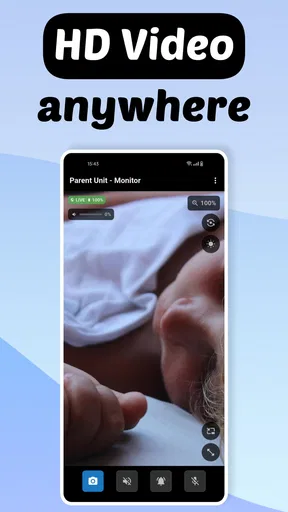
Let’s dive into some of the features that make this app a standout. The Baby Monitor Camera - NannyCam offers a crystal-clear video feed, both day and night, thanks to its night vision capabilities. Whether it's nap time or the middle of the night, you can see every detail with impressive clarity.
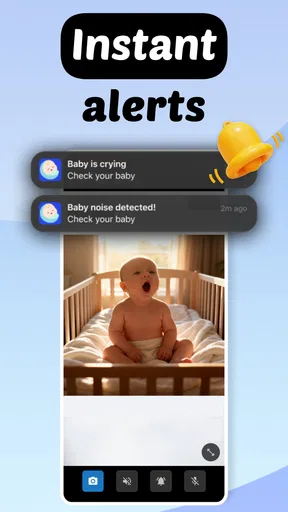
Another neat feature is the two-way audio. You can talk to your baby or sing a lullaby right from your phone, which can be a lifesaver if you need to calm them down without rushing to their room. Plus, the app sends notifications if it detects any sound or movement, so you’re always in the know.
The first useful check, and what alerts can’t do
Your first meaningful success is not simply opening the app; it is leaving the room, checking the live view from the parent phone, and confirming that you can hear what is happening without repeatedly returning to the nursery. I’d do this while another adult is present or while you remain close enough to check directly. Once that works, try the sound or movement notifications in a controlled way. This tells you whether the alert is noticeable on your phone and gives you a sense of how much ordinary household noise may prompt attention.
Alerts are most useful as a prompt to look, not as a substitute for listening or checking in. A notification can be missed if the phone is muted, out of reach, or occupied with something else; sounds in the room can also be less clear than they seem during a quick test. If you use them, keep the parent phone somewhere you can notice it and avoid treating silence from the app as proof that everything is fine.
Two-way audio can be handy when a child stirs and a familiar voice may help, but I wouldn’t assume that speaking through a phone will settle every baby. In some situations, the sound could startle rather than soothe, so try it while you are close enough to respond in person. That simple test helps you learn whether remote reassurance is useful for your child instead of discovering the answer during a difficult night.
Safety and Security
In today’s world, security is a big concern, especially when it comes to our kids. The app uses encryption to protect your video feed, ensuring that only you can access the footage. This means you can rest easy knowing that your privacy is protected.
Moreover, the app allows you to add multiple users. This is perfect for families or if you have a babysitter. Everyone can be on the same page when it comes to keeping an eye on the little one.
Using it around the house—and beyond
A realistic everyday use is a parent making dinner while a baby naps in a nearby room. With the camera-side phone positioned safely and the parent phone kept within reach, a quick glance can answer whether the baby is still settled without opening the nursery door. If a sound alert comes through, you can check the picture and decide whether to wait, speak through the app, or go in. That is a more measured routine than reacting to every small noise, while still keeping a direct check available.
The app may also suit a caregiver who wants to take turns monitoring rather than keeping one person beside the nursery. Multiple-user access can make that handoff more practical, but I’d agree on who is responsible at any given time and confirm each person can use the setup before relying on it. Shared access is helpful only when everyone knows how the camera phone is placed, where the parent device is, and what to do if the connection stops.
For use away from home, I would be more cautious than for a check from another room. The app’s stated support for mobile connectivity may be useful, but the experience can depend on network quality and the phone arrangement at both ends. Test remote access somewhere low-pressure before counting on it, and don’t make a trip out the first time you try it. If an uninterrupted, dedicated monitor connection is essential to you, a purpose-built baby monitor may be a better fit.
When a different monitor makes more sense
Compared with a traditional audio monitor, a phone-based app can offer the convenience of checking video on a device you already carry, as well as the option of talking back. An audio-only unit may be simpler when you mainly want to hear a baby and prefer a dedicated receiver that does not compete with your everyday phone use. A dedicated video monitor can also be preferable if you want equipment designed to remain in the nursery, rather than managing a spare phone and its power, placement, and connection.
NannyCam is most appealing if you have compatible devices available, want a flexible way to check in, and are comfortable testing the setup yourself. I’d skip it if you do not have a spare phone, dislike relying on a network, need a monitor that keeps working without attention to app and device settings, or would rather not manage access for multiple caregivers. Those are not small details: they determine whether a phone-based approach feels convenient or becomes one more thing to maintain.
Common confusion and practical limits
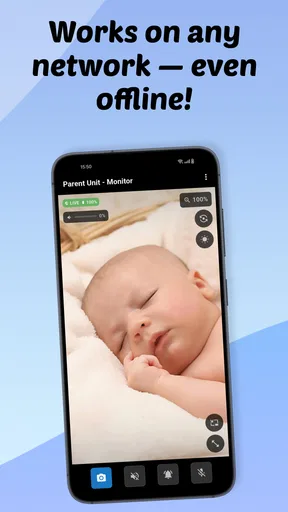
One point worth clearing up is the difference between offline support and an always-available live view. The app describes offline use, but that alone should not lead you to expect that every feature, including live video or alerts, will work in every disconnected situation. I’d test the specific mode you intend to use and plan around what you actually observe. If you need a dependable picture while the network is unavailable, verify that behavior before trusting it during a nap.
Another easy misunderstanding is assuming that a phone camera gives a complete view of the room. The angle is limited by where the device sits, and a change in position can leave a blind spot. Before settling into another room, look at the view from the parent phone and check that the image remains useful from the camera’s final position. If the phone has to be moved, repeat that check rather than assuming the previous view still applies.
Battery and phone availability are practical trade-offs too. The camera-side device is occupied while it is monitoring, and the parent-side phone needs to be available if you expect to see alerts or check the feed. I’d avoid making the nursery phone the only device you use for something else at the same time. Keeping both phones charged and choosing a reliable place for the camera device can prevent an otherwise avoidable interruption.
Privacy still deserves ordinary care even when a feed is protected. Use access only for people who genuinely need it, remove or change access when caregiving arrangements change, and avoid leaving a monitoring device pointed at more of the home than necessary. These are sensible habits for any connected camera, and they help keep the convenience of shared viewing from turning into unnecessary exposure.
What Makes It Stand Out?
There are tons of baby monitors out there, but what sets this one apart is its user-friendly interface and reliable performance. The app is intuitive, and everything is laid out in a straightforward manner. You don’t have to fumble around to find what you need.
Parents rave about how the app has made their lives easier. The ability to keep an eye on their baby from anywhere in the house—or even when they’re out—is a game changer. It’s like having an extra pair of eyes and ears at all times.
Who is likely to enjoy it?
I can see this working well for first-time parents who want to try video monitoring without immediately committing to a separate monitor unit, especially if an unused phone is already available. It can also make sense for families who share nursery checks and value seeing the room as well as hearing it. The important step is to treat setup as part of the routine: test the feed, test the alerts, and make sure the chosen placement remains safe and useful.
The app’s audience is broad: it is marked suitable for everyone, and it has a 4.6 average from around 50 ratings. It has also passed 10,000 installs, which gives a prospective user some context about its reach without telling you whether it will suit your home. Its current version is 1.1.0, and it runs on Android 7.0 or later. Those details are worth checking against your devices before you begin, particularly if you are planning to use an older spare phone.
For a first-time user, my practical recommendation is to start with one simple goal: make one reliable check from outside the nursery. Once that succeeds, decide whether video, sound alerts, remote access, or shared use genuinely improves your routine. You do not need to turn on every possibility at once; keeping the setup simple makes it easier to spot which part is useful and which part adds friction.
Final Thoughts
So, is the Baby Monitor Camera - NannyCam worth downloading? In my opinion, absolutely. It’s a fantastic tool for any parent who wants to keep a close watch on their baby without sacrificing their own freedom. With its easy setup, reliable features, and secure access, it ticks all the right boxes.
If you’re looking for a way to stay connected to your baby, even when you’re not in the room, this app is definitely worth checking out. So go ahead, give it a try, and enjoy the peace of mind it brings.
Pros
- Simple setup with user-friendly interface.
- Clear video quality even in low light.
- Two-way audio for easy communication.
- Reliable motion and sound alerts.
- Cross-platform support for Android and iOS.
Cons
- Requires stable internet connection.
- Limited free features; subscription needed.
- Occasional lag in video streaming.
- High battery usage during operation.
- No integration with smart home systems.
FAQs for Baby Monitor Camera - NannyCam
What features does the Baby Monitor Camera - NannyCam offer?
The Baby Monitor Camera - NannyCam provides a range of features including live video streaming, night vision, two-way audio, and motion detection alerts. It also offers cloud storage for saving footage and the ability to monitor multiple cameras simultaneously. The app is designed for easy setup and use, ensuring peace of mind for parents.
Is the Baby Monitor Camera - NannyCam compatible with all devices?
The NannyCam app is compatible with most Android and iOS devices. Before downloading, ensure your device runs on an updated operating system version for optimal performance. The app's versatility allows it to work seamlessly with various smartphone and tablet models, making it accessible for most users.
How secure is the Baby Monitor Camera - NannyCam?
Security is a top priority for the Baby Monitor Camera - NannyCam. The app uses end-to-end encryption to protect video and audio data. Additionally, users can set up password protection and customize privacy settings to ensure that only authorized individuals can access the camera feed.
What are the costs associated with using the Baby Monitor Camera - NannyCam?
The Baby Monitor Camera - NannyCam offers a free version with basic features. However, to unlock additional features such as expanded cloud storage and advanced motion detection, users can opt for a subscription plan. Pricing details are available within the app, providing flexibility based on user needs.
How user-friendly is the Baby Monitor Camera - NannyCam?
The app is designed with user-friendliness in mind, featuring an intuitive interface that simplifies setup and navigation. Step-by-step guides and tutorials are available to help new users get started quickly. The app's layout ensures that even those who are not tech-savvy can easily monitor their baby.


